
tcpMDT
[PRO] platform vertices report - MDT25
16.19 [PRO] Platform Vertices Report

This command is similar to the List of Lines the only difference being that it only analyses the platform vertices of the selected segment.
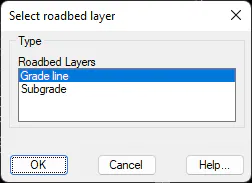
To do this, like previous commands, initially the work segment is selected then the roadbed layer with which to work is indicated, in the case that there are defined roadbeds:
Once the segment is selected the following window appears in which we specify the type of list we wish to obtain:
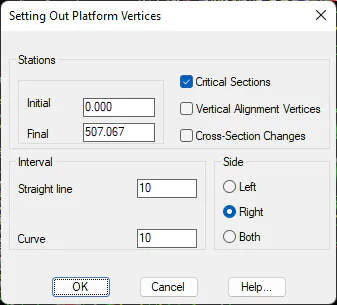
Stations
Initial station: Initial station from which the setting out will be performed.
Final station: Final station up to which the setting out will be performed.
Critical Sections: Activating this box adds the horizontal alignment's critical sections to the report.
Grade line Vertices: Activating this box adds to the list of grade line vertices found in the segment.
Cross-Section Changes: Activating this box adds to the list all the stations where any assignation has existed within the assignment of alignment sections.
Interval -- Straight line: Interval of analysis for the horizontal alignment on its straight segments.
Interval --Curve: Interval of analysis of the horizontal alignment for curved or clothoid sections.
Side: Indicate the side of the horizontal alignment to analyses.
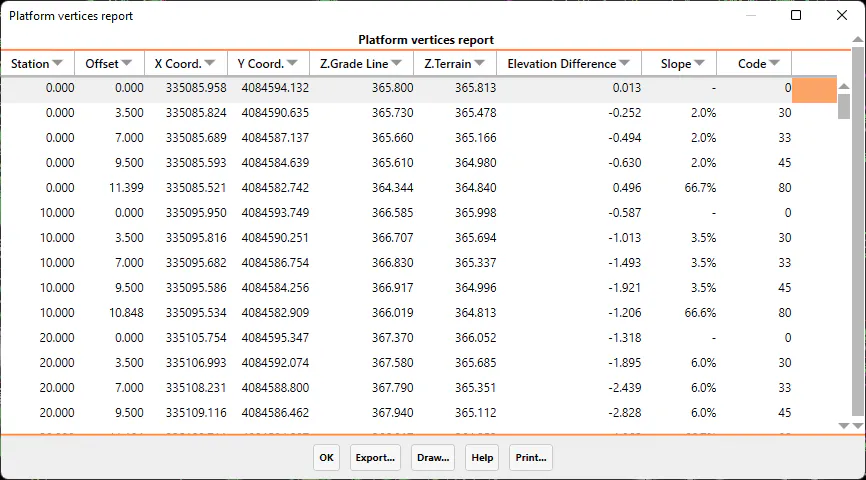
Export
When the Export option is selected, the program displays a new dialog box with different ways to export the data. The dialog box and a description of its characteristics appear below:
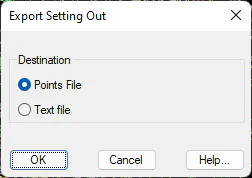
Points file: All the coordinates of all the points on the list are exported to a points file. When the dialog box is validated, the Export Points command is automatically executed. For further details, see the Points section.
Text file: Sends the contents of the list to an ASCII file, so that it can be edited or handled with a word processor.
When selecting this option, the list data is sent to the printer selected.