tcpMDT
Import - MDT25
25.3 Import
Using this command, a window is displayed containing a list of entry formats built up over the application's lifecycle.
Format Selection
Choosing a manufacturer automatically displays a list of the available models or formats on the right-hand side. The file format can be consulted by clicking the Details button. Should the format have more conversion options, the More Parameters button will be enabled.
Possible actions after a conversion has been made are as follows:
Check Observations. A dialog box is displayed containing all the observations converted. Points and stations can be identified, values edited and invalid observations deleted.
Import Survey. After converting a file in its original format to the .LEV format, the file is loaded automatically, without need of importing it.
Go to Station Calculation. After the conversion is completed, the Station Calculation dialog box is displayed automatically.
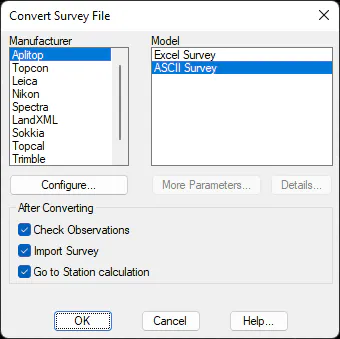
Once the dialog box has been accepted, the program displays a source file selection window in which one highlights the file one wishes to convert to the program's format. The program then requests a file name for the survey file.
Configuration of the Conversion
This dialog box is activated by clicking on the Configure button in format selection. It allows one to generically control of differences between point and station observations, in addition to any actions one may wish to perform should there be repetitions or inverse circle observations. Some of the formats available distinguish between different kinds of observation. In such cases, these options have no bearing on the conversion.
All options described in the dialog box can be stored in a file with a .CFG extension by pressing the Save button and subsequently recovered using the Load button.
Original total station file observations are considered point observations by default. In order for them to be considered as total station observations, the following options are available:
Code. Observations are considered as station observations if their code is within those entered in the field. Several can be shown, separated by commas.
Prefix. Observations are considered as station observations if their names start with one of the prefixes specified in this box. Several can be shown, separated by commas.
Ordinal. If this option is activated, only the observations falling within the Minimum and Maximum values entered are considered as station observations. The rest are considered as point observations.
Alphanumeric Ordinal. Observations are considered as station observations if their names are not numerical.
Observations to Occupation Points. If this option is enabled, a preliminary analysis is performed to check the source of all the observations. Observations are considered as station observations if they are origin observations. For instance, if observations from stations 1,2 and 3 are found, the observations from stations 1 to 2 and from 1 to 3 are considered to be station observations.
Observations from Different Occupation Points. A point should not be measured from several stations, since only one set of coordinates can be stored. If this option activated, these points are considered as station observations.
The reason why observations have been considered as station observations is indicated in the Check Observations dialog box's status line
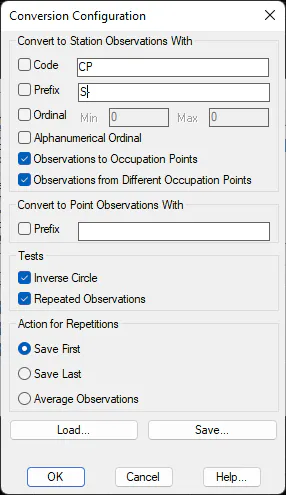
The tests conducted by the program are as follows:
Inverse Circle. If this option is activated, the second observation is considered to be the inverse of the first one if the program finds two consecutive observations with more or less complementary vertical angles.
Repeated Observations. If this check box is marked, observations are highlighted as repeated observations and the program takes whatever action has been specified in the Action for Repetitions section when repeated observations of a point or station are found.
The actions that may be chosen should repeated observations be found include the following:
Save First. Only the first observation is saved. The rest are discarded.
Save Last. The last observation found is saved. The previous ones are discarded.
Average Observations. One observation is created from the average of all the observations.
Checking Observations
This dialog box allows one to check whether the original total station file's conversion has been correctly executed, in addition to conducting some additional checks. All the observations are displayed on a list, in original files' order. Observations can be filtered, so that only Point or Station observations are displayed by activating the corresponding check boxes in the View box.
The Type column shows whether the observation is considered as a Point or Station. Clicking the buttons having the same name allows one to change the assignment of type.
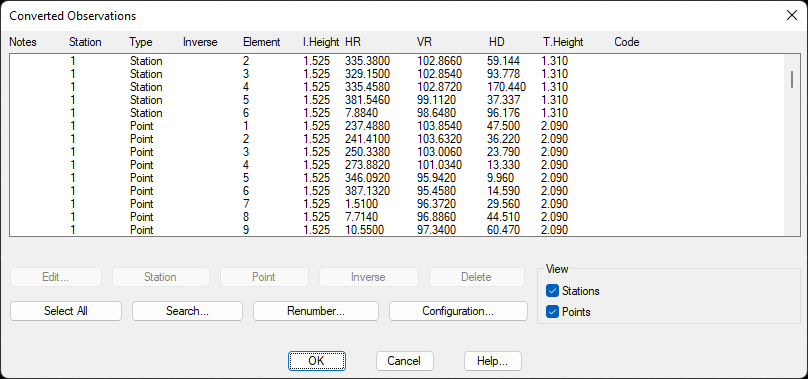
The Delete button highlights the observations selected for deletion when the dialog box is accepted. The Edit button allows one to modify the observation data selected. Lastly, the Search button can be used to find an observation by using any of its values.
Editing Observations
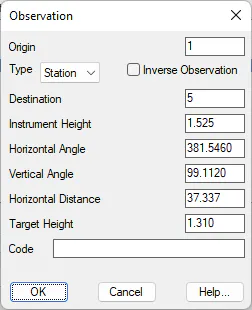
This dialog box allows the observation data to be modified before it is included into the current survey file. The Type field is used to set the type of Point or Station observation.
The Origin and Target check boxes display the name of the origin station as well as those of the station or point read. The Inverse Observation check box allows one to show whether one wishes to consider the observation as such.
Lastly, the Instrument Height, Horizontal Angle, Vertical Angle, Horizontal Distance, *Target Height and Code* boxes all contain information extracted from the original station format. This information is always displayed this way, although the information is not provided in this way. For example, if the original format stores geometric distance instead of horizontal distance, or elevation difference instead of vertical angle, these are automatically converted.
Search for Observations
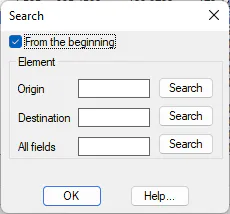
If the converted file contains a lot of measurements, this dialog box is useful. It is accessed by clicking the Search button in Converted Observations dialog.
The program begins to search from a specific element, unless the From the Beginning check box is marked. Depending on the check box marked, a search can be performed by Origin station, by the Destination station or point, or even for a particular field, by filling in the All Fields data.