
tcpMDT
Clothoid Line Clothoid Between Curves - MDT26
Clothoid -- Line -- Clothoid Between Curves
 | Command to execute in the CAD |
|---|---|
Vertical menu | MDT26 > Elements > Clothoids > Clothoid-Line-Clothoid between Curves |
Ribbon menu | |
Command line |
This command enables a clothoid, straight line and clothoid sequence to be inserted between two circular curves, so that the initial and final points of the set are tangential to each of the curves. The points used for the curves' selection determine the type of solution to be calculated. It is possible to differentiate between solutions with clothoids whose radii are of the same sign or of different signs.
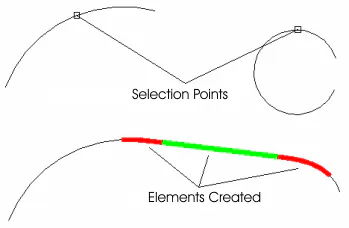
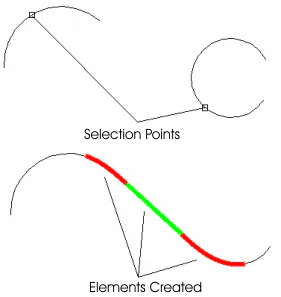
In addition to the curves, the program requests the lengths (or parameters) of the clothoids to be calculated.
In the specific case where the curves chosen are circles, the command does not cut the curve at the tangent point with the clothoid.