
tcpMDT
Curve Tangent to Two Lines or Curves - MDT26
Curve Tangent to Two Lines or Curves
 | Command to execute in the CAD |
|---|---|
Vertical menu | MDT26 > Elements > Curves > Curve Tangent to Two Lines or Curves |
Ribbon menu | |
Command line |
This command enables a circular curve to be inserted between two straight line or curve-type elements, so that the initial and final points of the curve are tangential to each of the elements selected. In addition to the most common tangent options to two straight lines or curves, a curve tangential to one straight line or curve may also be calculated.
Curve Tangential to Two Lines
When straight lines are not grouped together, the points used to select them determine which of the possible arches will be chosen as the solution. Starting from the straight lines' intersection point or from their extension should they be cut, the program divides the plane into four areas and calculates the circular arch situated in the area delimited by the curve selection points.
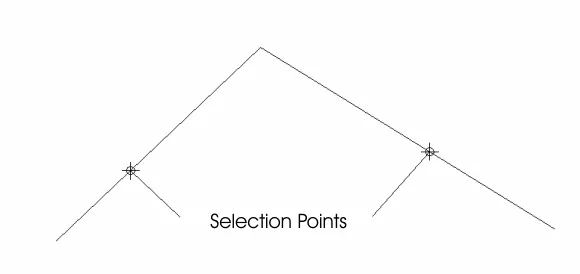
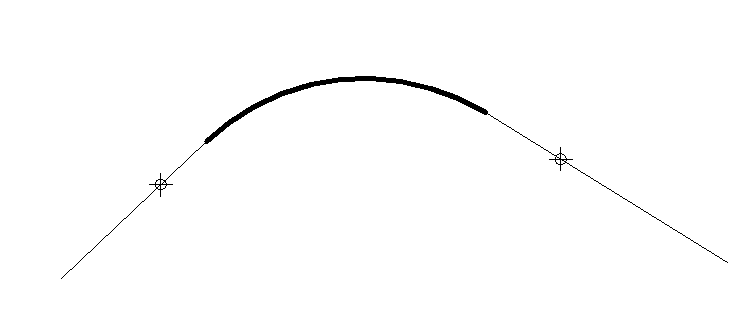
Once the straight lines have been selected, the program needs one more parameter in order to determine the arch. The available options include:
Radius: The circular curve's radius is entered.
Length: The circular curve's length is entered.
Chord: The straight-line distance between the ends of the arch is entered.
Tangent: The distance from the end of the arc to the straight lines' intersection point.
Arrow: Minimum distance from the straight lines' intersection point to the arch.
Pass-Through Point: This option asks for one of the arch's pass-through points.
Depending on the fit options configured, it will not always be possible to calculate the solution. If the Strict Fit option is activated, it may therefore be the case that due to the lengths of the straight lines used it is not possible to fit an arch having the parameter specified between them, so that it will be tangential to both straight lines.
Curve Tangential to Two Curves
If the aim is to calculate a curve tangential to two other curves, it may only be calculated if the radius of the curve desired is specified.
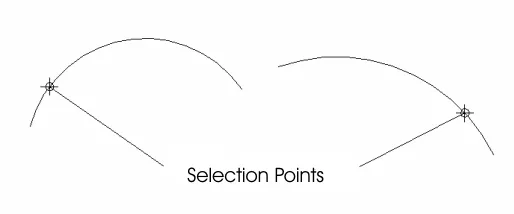
Once the objects have been selected and the radius has been indicated, the program displays a dialog box asking users to specify the solution desired from among the possible alternatives:
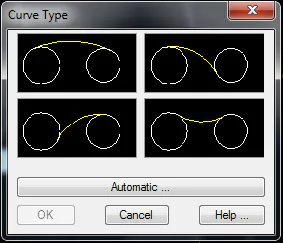
If the Automatic button is clicked, the program will calculate the solution that is best adapted on the basis to the points selected. Should this solution not be the correct one, the changes can be undone and the process repeated.
Curve Tangential to a Line and a Curve
If the aim is to calculate a curve tangential to another curve and a straight line, it may only be calculated by specifying the radius of the curve desired.