
tcpMDT
Isolated Straight Line - MDT26
Isolated Straight Line
 | Command to execute in the CAD |
|---|---|
Vertical menu | MDT26 > Elements > Lines > Isolated Straight Line |
Ribbon menu | |
Command line |
This command enables a line to be drawn independently. In other words, without it belonging to any alignment or being related to any road design element. Although the same result can be obtained by drawing a straight line directly on CAD, with this command the element is drawn automatically in the alignments layer with the color assigned for straight lines in accordance with the values specified in the program's configuration.
A dialog box appears with the following data:
X,Y Coordinates. Coordinates at beginning of straight line. They may be entered numerically or graphically by clicking on the < button.
Azimuth. Straight line's azimuth, in hundredths of a degree. Its value may be typed into the relevant box or it may be designated graphically with the < button situated to its right.
Length. Distance to the straight line's end point.
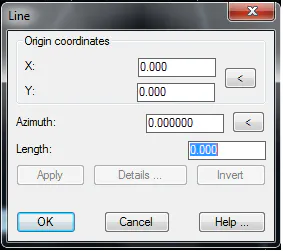
The Apply button uses the current values to draw the straight line desired without having to exit the dialog box. Once the OK button is clicked, the straight line is added to the current drawing.
The Details button shows detailed information about all the straight line's geometrical parameters, as explained in this chapter's introduction.
The Invert button interchanges the straight line's initial and final points.