
tcpMDT
Material Execution Budget - MDT26
Material Execution Budget
 | Command to execute in the CAD |
|---|---|
Vertical menu | MDT26 > Measurements > Work Units > Material Execution Budget |
Ribbon menu | Volumes > Work Units > Budget Execution |
Command line |
This command enables us to calculate a budget for the execution of the selected elements. Each works unit will have a price assigned per unit, and the calculation will be made based on this price in accordance with the measurement of the element in question.
First of all, as in the two previous commands, the program will ask for the elements for which the budget is to be executed. In this case we will select tango segments such as earthworks or entities with assigned works units.
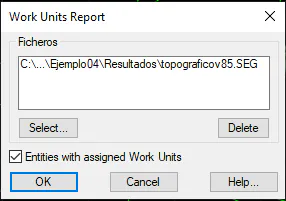
Once the dialogue box has been checked, the list with the estimate for both each works unit and the total will be displayed.
The calculated measurement resulting from multiplying the geometric measurement by the density and the allocation assigned to the works unit in question will be used as a reference.
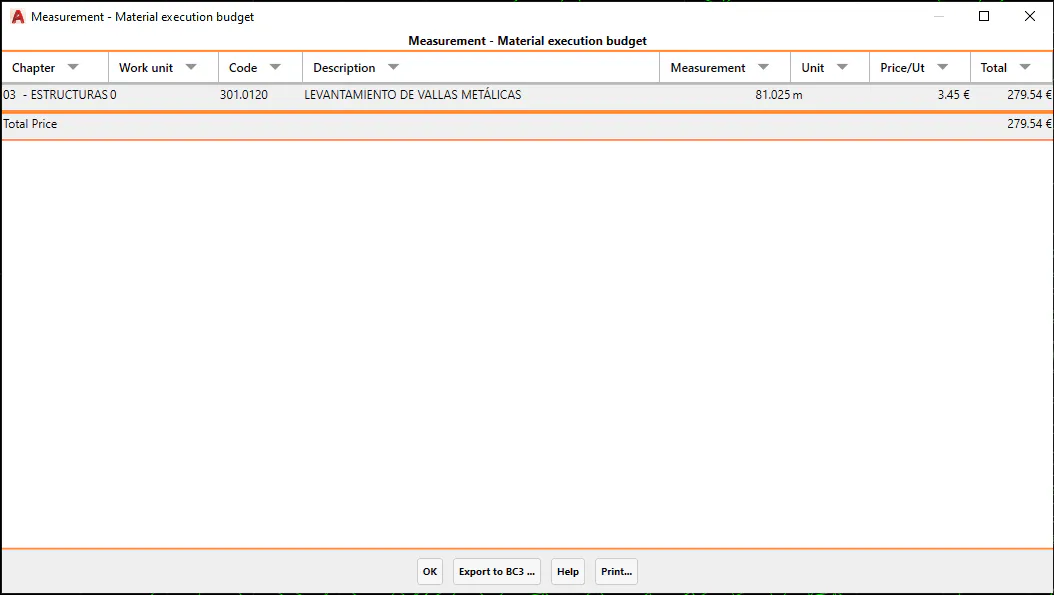
Chapter: The chapter of the selected works unit.
Works Unit: The name of the assigned works unit.
Code: The code of the assigned works unit.
Description: A brief description of the assigned works unit.
Measurement: The sum of the product of the Geometric Measurement, Density and Endowment factors.
Unit: The unit of the assigned works unit.
Unit Price: The price per unit.
Total: The total price. The result of multiplying the unit price by the measurement.
This list includes the option of exporting the information to BC3, whereby clicking on the "Export to BC3" button will request the output file.
A BC3 file (also known as FIE-BDC format) is a standard file that enables the easy exchange of information between budget programs and databases, in this case, Civil Engineering.