
tcpMDT
Road Works Units Report - MDT26
Road Works Units Report
 | Command to execute in the CAD |
|---|---|
Vertical menu | MDT26 > Measurements > Work Units > Road Work Units Report |
Ribbon menu | Volumes > Work Units > Work Units |
Command line |
This command enables us to generate a report on the Work Units of the selected elements. The following items can be selected:
Segments with pavement layers to which works units have been assigned.
Earthworks to which works units have been assigned.
Entities to which works units have been assigned.
The following window will appear in which we add the segment or earthworks files. Furthermore, we can specify that the entities in the drawing with assigned works units are to be analyzed.
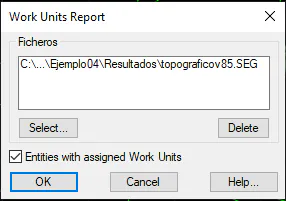
Finally, the following list will appear with the report:
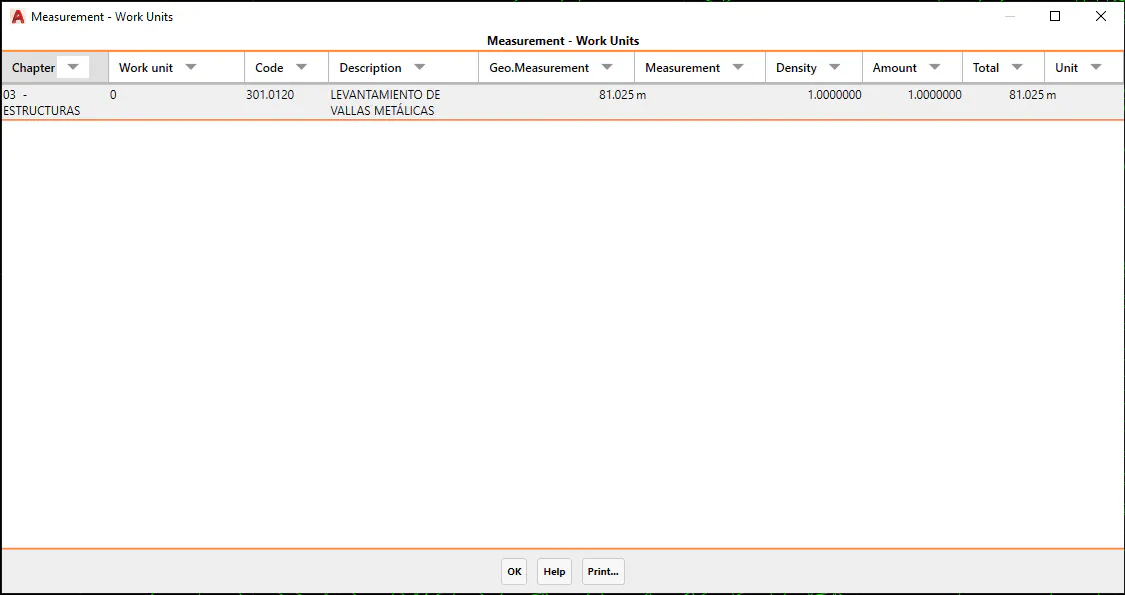
Chapter: The chapter of the selected works unit.
Works Unit: The name of the assigned works unit.
Code: The code of the assigned works unit.
Description: A brief description of the assigned works unit.
Geometric measurement: The measurement of the element to which the works unit applies.
Unit of Measurement: The geometric unit of measurement.
Density: The density assigned to the works unit.
Amount: The amount assigned to the works unit.
Total: The sum of the product of the Geometric Measurement, Density and Amount factors.
Unit: The unit of the assigned works unit.
As with all the lists, it features the "Print" option with the possibility of sending the information to any of the available output options.