
tcpMDT
Merge Meshes - MDT26
Merge Meshes
 | Command to execute in the CAD |
|---|---|
Vertical menu | MDT26 > Meshes > Merge Meshes |
Ribbon menu | Meshes > Edit > Merge |
Command line |
This tool will allow us to merge two more meshes into a single mesh file. When you start the command, it will ask for the meshes to be merged, being able to select two or more files.
In the event that all the selected files have the same cell size, it will then request the new mesh file to be created, resulting from the previously selected ones.
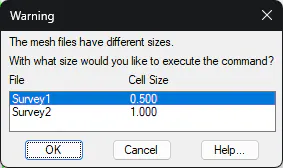
If the mesh files have different cell sizes, you can only merge them two by two, in which case, once selected, the following dialog will appear in which we will indicate the cell size for the new mesh to be created.
Move Meshes
This command allows you to move a mesh indicating an absolute displacement in either X, Y or Z, or relative to a designated point on the screen.
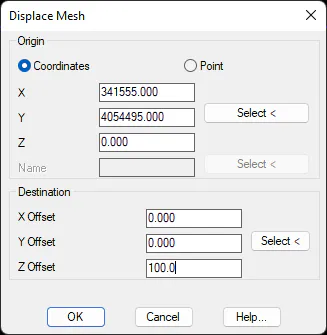
In the dialogue we have the following options:
In Origin, we can select the X, Y, Z Coordinates and the corresponding button to designate on the screen are activated. Or we can select Point, the Name box and the corresponding button will be activated to designate a point in the drawing.
Under Destination, there are three boxes to indicate the offset by entering the value or designating an on-screen offset relative to the coordinates entered at the source.
When accepting , the mesh will be moved and a destination file will be requested.