
tcpMDT
Resample Mesh - MDT26
Resample Mesh
 | Command to execute in the CAD |
|---|---|
Vertical menu | MDT26 > Meshes > Resample Mesh |
Ribbon menu | Meshes > Edit > Resample |
Command line |
Another file with a different cell size can be created from an existing mesh file. Firstly, the program requests the original mesh file. It then shows the following dialog box where New Cell Size and the File Type of the mesh to be created are entered. It is also possible to select the coordinates of the resulting mesh's corners to obtain a smaller surface.
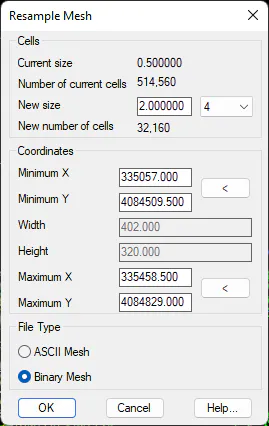
Current size: The size of each current cell in the mesh to be resampled.
Number of current cells: The number of existing cells in the mesh to be resampled.
New size: The new cell size for the resulting mesh. The value of the size of the cell may be inserted manually or in the dropdown menu selecting the multiplying factor.
Number of new cells: The total number of cells for the new mesh based on the new size established.
Coordinates: This option enables us not to convert the complete mesh but just a part of the same, for which we need to graphically define the window which defines the part of the mesh to be converted. The complete mesh will be resampled by default.
File Type: Enables us to create an ASCII or binary mesh on creating the resulting mesh.
In reality, if one has the surface file used to create a mesh file in addition to the mesh file, it is much more accurate to create another mesh file with the cell size desired than to resample the mesh. This option should solely be used if one only has the mesh file.