
tcpMDT
Create Mesh from Points - MDT26
Create Mesh from Points
 | Command to execute in the CAD |
|---|---|
Vertical menu | MDT26 > Meshes > Create Mesh from Points |
Ribbon menu | Meshes > Create > Mesh from Points |
Command line |
This command allows the creation of a mesh file from a set of points. The program initially selects all the points to be found in the drawing.
In File Type you must specify the type of mesh to be created: ASCII Mesh or Binary Mesh. When you choose one or the other option, the approximate size of the file to be created is displayed.
The Cell Size parameter determines the spacing between the coordinates of the mesh. The smaller this value, the denser the mesh and the larger the file will occupy, but if the mesh is used for a volume calculation, the result will be more accurate. See the calculation of volumes by Mesh Difference in the Volumes section.
There is the possibility of specifying an Outline by designating a closed polyline with the Select button. In this way, the mesh would be defined only within the contour polyline. This check slows down the mesh creation process, so it is not advisable for very dense meshes.
If we activate the Interpolation limit box, we have the possibility to control the maximum distance for the creation of cells between points. This parameter makes sense in very dense point clouds, otherwise they can create gaps inside the mesh.
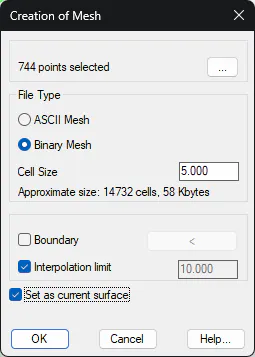
Finally, there is the option of establishing the mesh created as the Current surface provided that the mesh file type is binary.