
tcpMDT
Reverse Bisection - MDT26
Reverse Bisection
 | Command to execute in the CAD |
|---|---|
Vertical menu | MDT26 > Surveying > Utilities > Reverse Bisection |
Ribbon menu | |
Command line |
This is a tool used to easily adjust a positioned station by calculating its coordinates and disorientation, as well as the transformation scale for the possible combinations that can be made from the reference station.
The program displays the Inverse Bisection window, which displays the name of the calculation station and three frames providing information on the Coordinates of points A and B and the Observations taken between the origin station and the reference stations. Lastly, the Results provided by the X and Y coordinates, the disorientation and the scale are also displayed. Like other calculation procedures, if the window is validated, the data will be stored in the initial coordinates database as approximate or provisional values. The "Change Coord" observation indicates this.
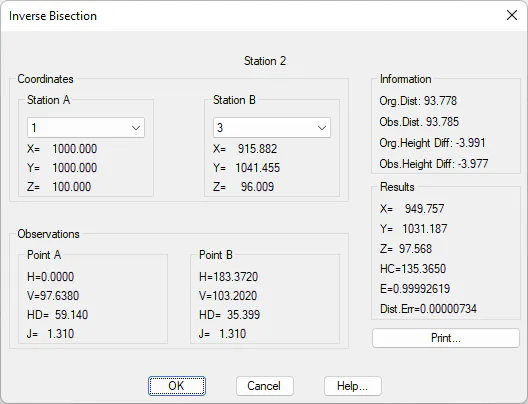
The target stations to be used in the calculation can be selected from existing observations, by marking the elements in the drop-down list. Stations A and B must be different.
The Print button displays a list containing the calculations. It has the following format:
Station 55
STATIONS COORDINATES
A 56 B 54
X=547.606 X=1210.358
Y=680.041 Y=1090.445
Z=66.089 Z=113.570
OBSERVATIONS
H=260.8110 H=74.1493
DR=554.106 DR=228.981
V=103.9060 V=96.2592
J=1.310 J=1.310
RESULTS
X=999.998 Y=999.999
E=0.9999964259 CH=0.0000