
tcpGPS
Replacing or averaging already existing point - GPS v2
10.4 Replacing or Averaging already existing point
When the point number in the status toolbar or in the numerical surveying screen is manually changed, if the point number already exists, it will be marked in red.
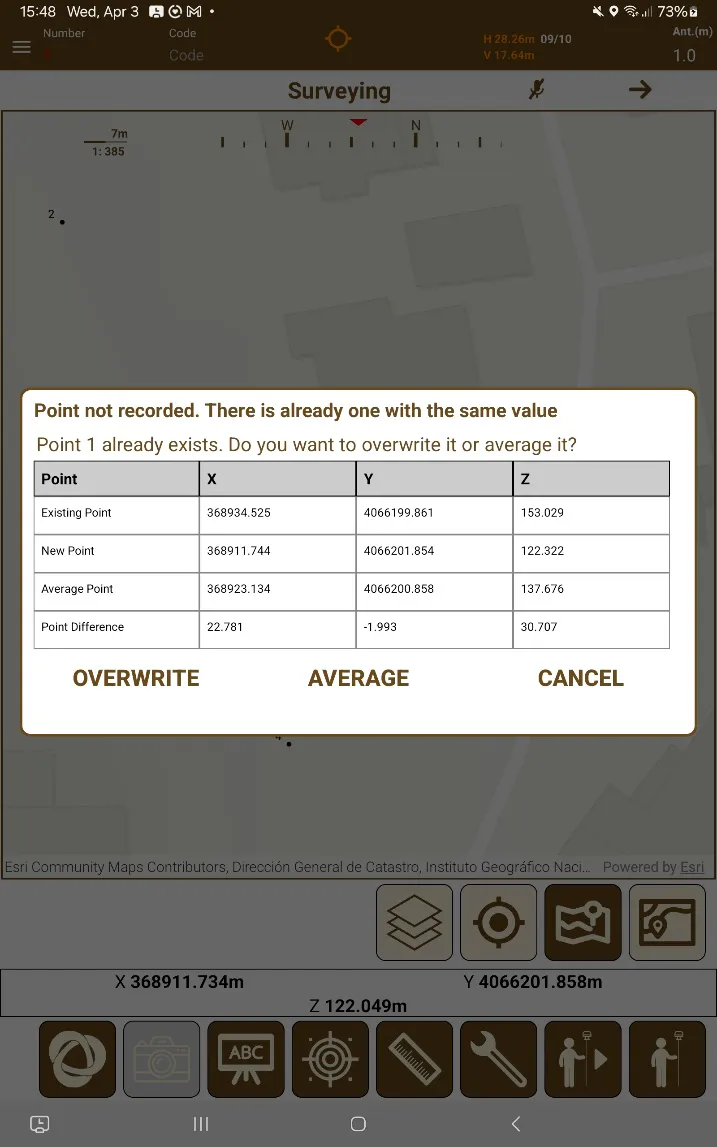
When a point is taken after doing so, a dialog will appear showing the XYZ of the previously existing point, the new point taken with the same point number, the averaging of both points, and the difference between the two.
 |
|---|
Figure 65. Dialog for replacing or averaging an already existing point |
If a point is overwritten, they are completely replaced, both X/Y/Z and also the raw data.
If a point is averaged, the existing point and the new point X/Y/Z are averaged, the raw data from the new point is added, and then the raw data entries are averaged, the point will be considered an obvservation/precision point, as if it was taken via epochs.