
tcpGPS
Taking points via epochs - GPS v2
10.7 Taking points via epochs
As it was seen in the template of the Configuring the workspace - GPS v2 it is possible to establish the observation time of a point. When the observation time is greater than 0, by taking a point in an individual capture, and touching the point taking button, or the option Long press for precision points is active and a long press is performed on the point taking button, epochs will then be taken during the interval. When the measurement is finished, the list of captures taken and the differences with the average are displayed. If the measurements taken are considered acceptable, the point can be recorded or discarded for a new measurement.
As shown in the section Configuring the workspace, it is possible to stablish the point observation time. When the stablished observation time is more than 0, and the stake out button is pressed, or the option Long press for precision points is activated, and a long press is performed in the stake out button, its possible to perform a stake out of a point via epochs.
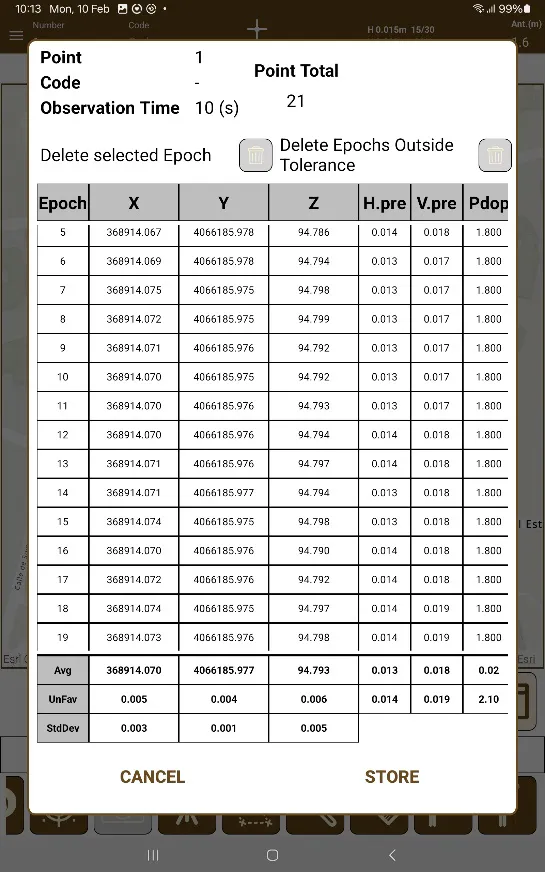
After performing the checks signaling the point validity, the point observation dialog is opened, where epochs from the GNSS Receiver are taken, and once it is finished, the average of all epochs are shown.
 |
|---|
Figure 78. Point via epochs |
Figure 78. Point via epochs
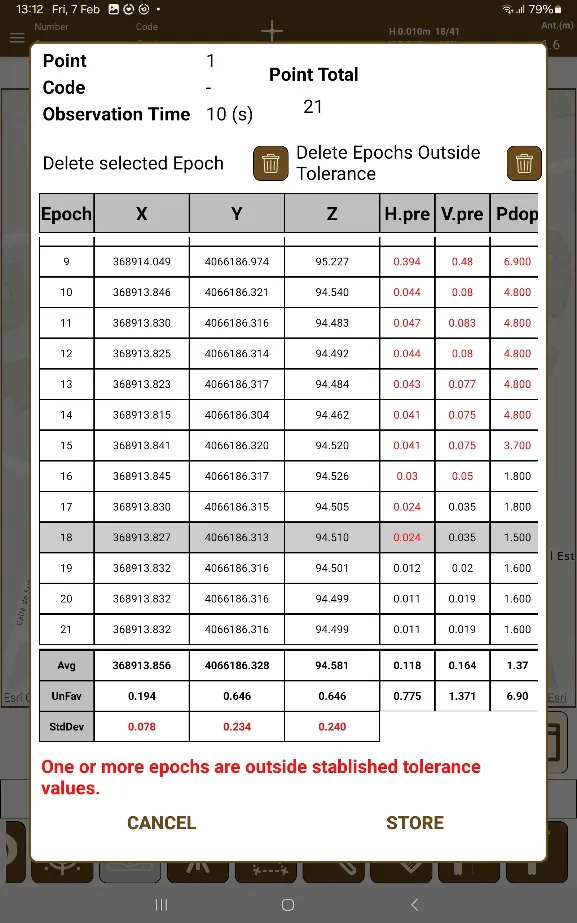
In the case that one or more epochs are not in the specified tolerance measures specified in the configuration, the dialog will warn of this fact. If there is a need to remove unwanted epochs, it is possible to touch them to select them and then touch the delete button.
It's also possible to touch the button of "Delete Epochs Outside Tolerance", which will erase each and every single one of the epochs of the list that are outside of the correct tolerance, not only the selected one.
 |
|---|
Figure 79. Point via epochs outside of allowed tolerances |