
tcpMDT
Create from mesh - MDT25
4.6 Create from Mesh
This tool will allow us to create a surface from a file of MDT meshes. When executing the command, it will ask us for the mesh file and then the following dialog will appear:
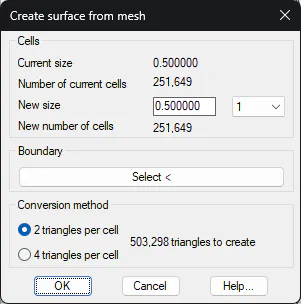
Cells: Information of the selected mesh file.
Current size: Mesh dimension of the selected file.
Current number of cells: The number of cells in the selected mesh file.
New size: We set the cell size from which the surface area will be calculated. This option is particularly useful if the mesh is very large, then we have the possibility of increasing the cell size and consequently, the surface to be created will have a smaller size but also less precision.
Boundary: Possibility of not converting the entire mesh. We can designate a closed polyline with which we will delimit the area from which we want to calculate the surface.
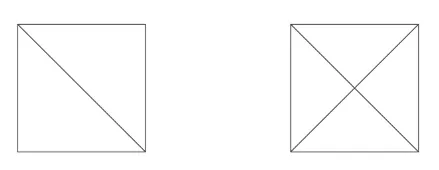
Conversion method: When creating the surface triangles, you may create two or four triangles per cell. In both cases, and depending on the selected dimension, the number of triangles on the new surface is reported.
After validating the dialog, it will ask us for the surface file to be created and the CAD command Line will inform us of the conversion made.