
tcpMDT
Mode - MDT26
Mode
In all subsequent commands it is requested to select an image and the selection of the name and the location of the resulting image is allowed. When the command completes, in the drawing the original image is replaced by the resulting image.
Grayscale
 | Command to execute in the CAD |
|---|---|
Vertical menu | MDT26 > Images > Mode > Grayscale |
Ribbon menu | Image > Adjust > Grayscale |
Command line |
This converts the selected image into a grayscale image.
Color Resolution
| Command to execute in the CAD |
|---|---|
Vertical menu | MDT26 > Images > Mode > Color Resolution |
Ribbon menu | Image > Adjust > Color Resolution |
Command line |
This shows a dialogue in which it is allowed to change the number of pixels per color which the selected image has.
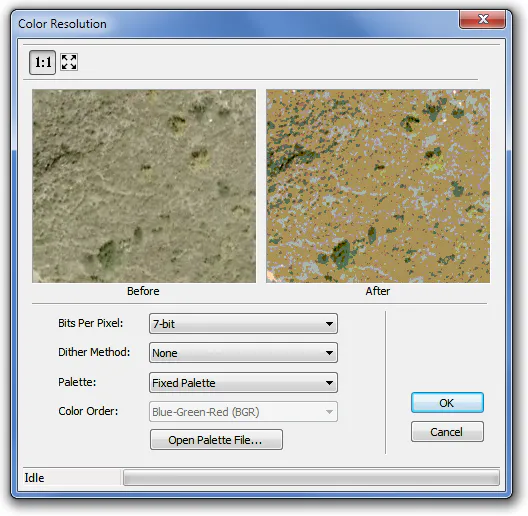
In the dialogue the image is shown before and after applying the changes, in these image controls, the images can be viewed on a scale of 1:1 or a complete image.
The fields shown in the dialogue are:
Bits per pixel: this allows the number of bits per pixel of the image to be changed from 1 bit to 32 bits.
Dither method: this allows the selection of the squaring method to be applied to the image. This option will be activated when 8bits or less is selected in the Bits per pixel field and this is when one of these methods must be selected: None, Floyd Stein, Stucki, Burkes, Sierra, Stevenson Arce, Jarvis, Ordered and Cluster. The Ordered and Cluster method are the speediest and the most effective for reducing an image at 256 colors or less. The rest of the methods deploy error-diffusion algorithms with which greater quality is obtained; amongst these methods it would be worth highlighting the Floyd method which is the one that has the greatest quality and is the speediest and, generally speaking, the quality of these methods will depend on the size of the image or on what it is wished to do with the resulting image, viewing or printing it.
Palette: this allows the selection of the color palette which will be used for the image and the different options are fixed Palette, Optimized Palette, Netscape Fixed Palette, Windows Identity Palette, SVGA Palette, Uniform Palette and MSIE Palette. This option is also activated when selecting 8bits or less in the Bits per pixel field.
Color order: this allows the selection of the order of the three color components, Blue-Green-Red (BGR), Red-Green-Blue (RGB).
Open palette file: to select a palette which is different from the Palette options.