
tcpMDT
[PRO] Elevations Report - MDT26

Elevations Report
 | Command to execute in the CAD |
|---|---|
Vertical menu | MDT26 > Setting Out > Elevations |
Ribbon menu | Setout > Analysis and Set-out > Elevations Report |
Command line |
This command generates a list of elevations of the vertices selected from the working segment.
To do this the command initially requests the segment file and then the roadbed layer (if this exists) from which to calculate the elevations. Once selected the following window is displayed for establishing the type of report to generate:
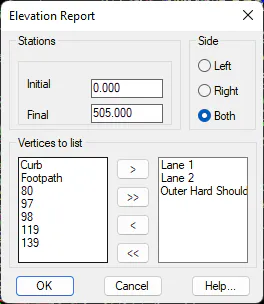
Initial station: Initial station from which the setting out will be performed.
Final station: Final station up to which the setting out will be performed.
Side: Side of the horizontal alignment we wish to analyze.
Vertices to list: It is necessary to send the left list of vertices for which we wish to calculate the elevation to the right list of vertices. In the right list only the vertices existing in the roadway or segment selected will appear.
Once this dialog box is validated the following list will appear with all the information on the elevation requested. The list is given by stations with the analyzed vertex appearing at the top of each column.
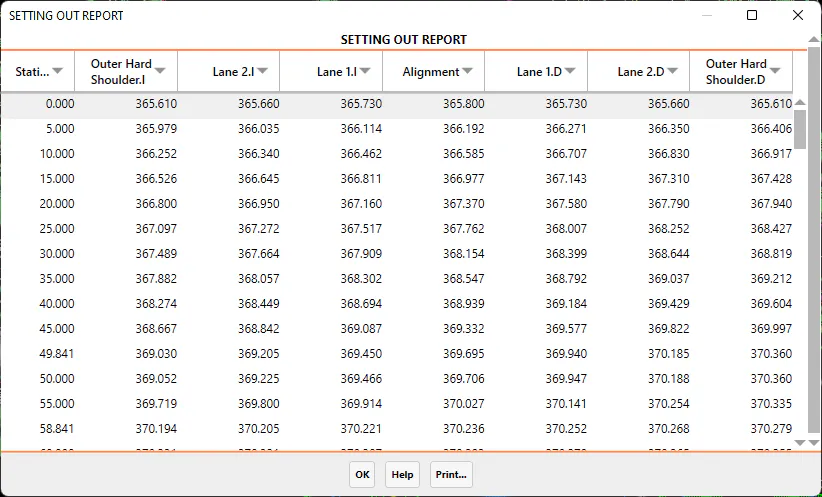
As in all lists, it has the option to send it to Print according to the different options the program offers.