
tcpScancyr
Cross sections calculation - TNSB3
10.1 Cross Sections Calculation
When you have established the alignments and points you may then calculate the cross sections from the points cloud. The algorithm only uses points that are not filtered out.
The application features two methods to calculate cross sections. The first of these is accessed via the menu "Cross Sections -> Calculate Cross Sections" and can be used in points cloud taken with a scanner. You should use the menu "Cross Sections -> Calculate Cross Sections by regression" in case the points come from a station (low-density points cloud). The two methods use the same input parameters, except the second one the filter is not applicable.
When you select the calculation of cross sections, the following dialog box will be shown which allows you to alter the following parameters.
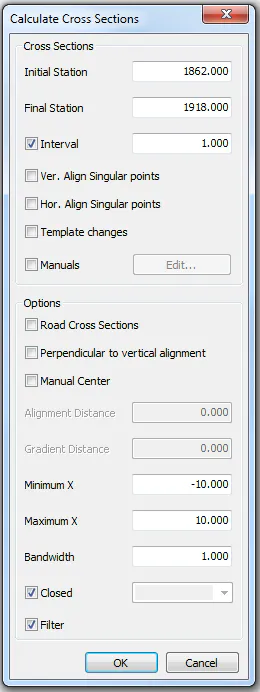
Figure 30 - Calculate cross sections
Initial Station: The station from which you will begin to calculate cross sections. The default value is the minimum station of the points cloud.
Final Station: The last station from which you will calculate cross sections. The default value is the maximum station of the points cloud.
Interval: Indicates the separation of each cross sections.
Unique points: To create a cross section on the unique horizontal or vertical alignment points depending on the mark.
Manuals: To create cross sections on specific stations.
Gradient perpendiculars: when enabled the cross sections will be perpendicular to the vertical alignment, if they are disabled they will be perpendicular to the XY plane, or the deviation you have defined in the cross sections (only for manual cross sections).
Manual Centre: This is used to change the origin of sorting algorithm. The values are relative to the horizontal and vertical alignment.
Bandwidth: The band of points taken in order to measure cross sections, using points within the following range:
Station point  [Station - Bandwidth / 2, Station + Bandwidth / 2]