
tcpScancyr
Elements to be represented - TNSB3
10.7 Elements to be Represented
Features options which change the representation of the cross sections on the screen. There are options that are only available if there is a station-defined template for the cross sections you are viewing.
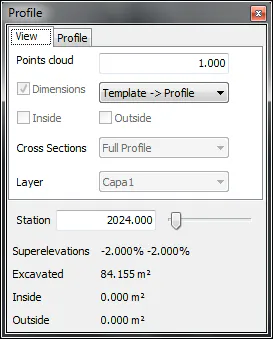
Figure 35 - Cross Sections viewing options
Points color You change the points band that you wish to take using the Edit box on the right. To show or hide the point cloud you must use the layer control.
Dimensions: Activate this option if you want to show dimensions between the template and the calculated cross sections. By selecting the option "Section -> Cross Section" or "Cross Section -> Section" you can choose the direction of these heights. In the first instance, the straight line from the section to the cross sections is used, whilst in the second, the minimum distance from the cross sections points to the section are displayed.
Inside: Fills in the cross sections areas that are within the template or reference cross sections.
Outside: Fills in the cross sections areas that are outside the template or reference cross sections.
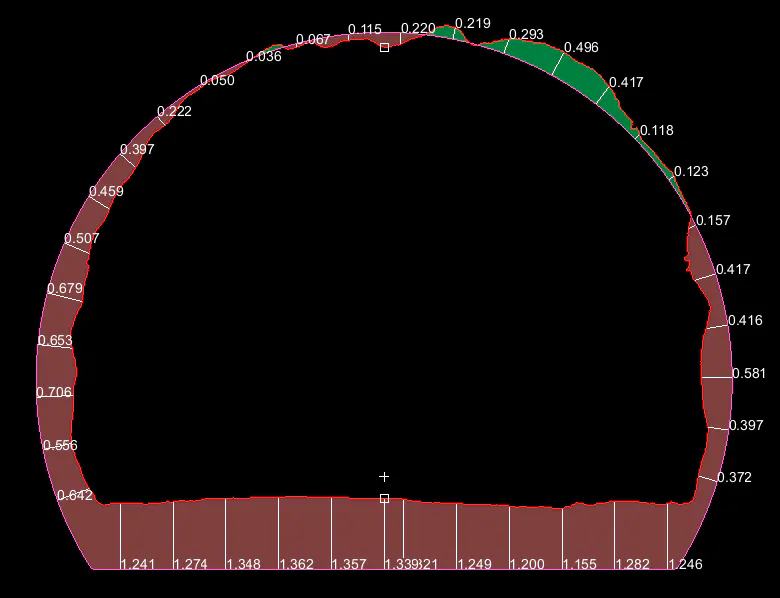
Figure 36 - Cross Sections showing all active heights and surfaces