
tcpMDT
Contours. Change Elevation - MDT26
Change Elevation
 | Command to execute in the CAD |
|---|---|
Vertical menu | MDT26 > Contour Lines/Mapping > Change Elevation |
Ribbon menu | Contours > Edit > Change Elevation |
Command line |
This tool allows one to change the elevation of any vertex on the polyline or of the whole polyline. The command has three different operating modes:
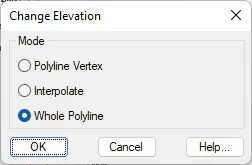
Polyline Vertex: The program requests the polyline's vertex and then its elevation may be entered directly or by interpolating between the previous and the next vertices.
Interpolate: The program requests two of the polyline's vertices and then the program automatically interpolates the elevation of all the vertices to be found between the two vertices selected.
Whole Polyline: The program requests a polyline and a elevation and then all the polyline's vertices are raised to the elevation entered.