
tcpMDT
Separate Contour Lines - MDT26
Separate Contour Lines
 | Command to execute in the CAD |
|---|---|
Vertical menu | MDT26 > Contour Lines/Mapping > Utilities > Separate Contour Lines |
Ribbon menu | |
Command line |
On many occasions, contour maps are imported in which no graphic difference exists between the minor and major contour lines. This command may be used in order to be able to distinguish one kind from the other.
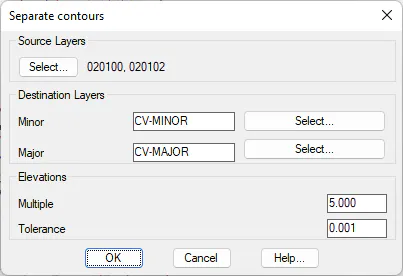
As can be seen in the dialog box, the layers containing contour lines have to be specified. The program will move the objects to the Minor or Major layers. One will be distinguished from the other according to whether the contour line is a multiple of the number entered in the Multiple Factor parameter. Additionally, the Tolerance parameter allows any contour lines to be selected lying above or below the indicated elevation multiple tolerance.
For instance, in the case of a contour line map whose equidistance is one meter and elevation interval are between 100 and 150 meters above sea level and one wishes that the major contours be at 100, 110, 120, 130, 140 and 150 meters, a multiple factor of 10 has to be specified. If one additionally wishes to extract any contours that are one meter above or below, a tolerance of one meter has to be specified.