tcpMDT
[PRO] Filtering - MDT26

Filtering
 | Command to execute in the CAD |
|---|---|
Vertical menu | MDT26 > Contour Lines/Mapping > Filtering |
Ribbon menu | Contours > Edit > Filtering |
Command line |
This command groups together a series of algorithms whose aim is to eliminate certain vertices on the polylines selected. It is thus possible to correct the various errors which may exist in the contour line.
The program will execute the algorithm previously set in the program configuration (see Contours Lines section in the Customization Manual).
Tunnel Algorithm
When this command is run, the following dialog box will appear. A more detailed description is given below.
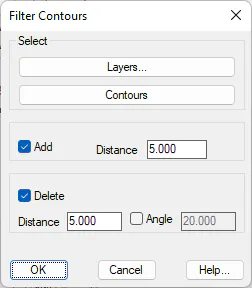
Select: The contour line that are going to intervene in the filtering are selected in this section. These contour lines may be selected by two methods.
Contours: We graphically name the contours to be filtered, via the standard CAD modes of object selection.
Layers: The layers where the contour lines or polylines to be filtered are to be found are selected.
Add: If this option is marked, MDT will enter vertices in the polyline in any segments whose length is greater than the value entered in the Distance control. It will therefore be impossible for there to be polyline segments whose length is greater than that distance.
Delete: If this option is marked, MDT will use the following algorithm to eliminate vertices:
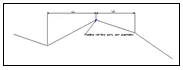
For a vertex on a polyline to be eliminated, two conditions must be satisfied:
The distance from the previous and next points cannot be greater than the distance specified in the Distance control.
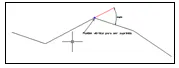
The angles formed by the previous and next points with respect to the vertex cannot be greater than the value entered in the Angle control.
Midpoint Algorithm
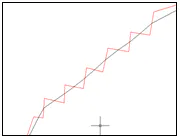
The aim of this algorithm is to seek a filter for polyline vertices while seeking the polyline's smoothing at the same time. The process consists of creating a new polyline from the original polyline by using its segments' midpoints. When this algorithm is selected, the program requests two parameters:
Minimum Segment Length: Any segment of the polyline whose length is greater than the value entered will be processed by the algorithm.
Maximum Length Accepted: If there is any segment whose length is greater than this distance, the segment will be subdivided into as many minimum segment lengths as possible.
MDT will start by processing all polylines with the second parameter and will then apply the first in order to extract all the intermediate points.
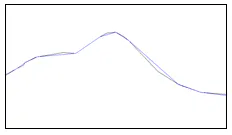
The effect of applying the algorithm to a polyline may be seen below.
Inner Segment Algorithm
The application of this method consists of the fact that there can be no polylines among those selected whose length is less than that of a given length.
When the algorithm is executed, the program starts by requesting the contour lines or polylines that are to intervene in the algorithm and then the size of the segment. MDT then will progressively eliminate any of the polyline's vertices that do not comply with the aforementioned requirement.