
tcpMDT
Delete Contour Lines - MDT26
Delete Contour Lines
 | Command to execute in the CAD |
|---|---|
Vertical menu | MDT26 > Contour Lines/Mapping > Delete Contours |
Ribbon menu | Contours > Edit > Delete |
Command line |
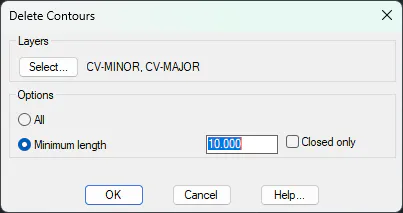
The command displays a window where you can Select... the layers where the curve is drawn. In the options you can choose between deleting All Curve or only curves that do not reach a Minimum length. The Closed Only option restricts operation to closed curves. With these last two options, contours created with a LIDAR model, thar has a lot of vegetation noise, can be corrected.
When one is working with a very large drawing, it is possible that the editing of surveying points is too slow due to automatic contouring. In such cases it is a god idea to delete the contouring and probably to destroy the current surface in order to generate the contours again later once the editing has been completed.