
tcpMDT
Create long section from several surfaces - MDT25
9.6 Create Long Section from Several Surfaces
This command, similar to the previous one, will allow us to obtain several profiles simultaneously, but in this case from several surfaces.
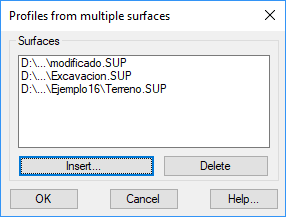
When executing the command, the following window will appear, in which we will add the different surfaces with which we will work. It is possible to add both surface and grid files (extensions SUP and MDE).
Then the command will request the alignment, either by designating graphically or from a file. Once selected, the following dialog will appear in which we can configure the sampling in the generation of the profile.
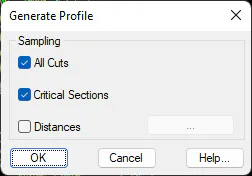
All Cuts: It generates a cut in the profile for each intersection with a triangle of the surface.
Critical Sections: It generates a cut in the profile in each one of the critical sections of the alignment from which it is generated.
Distances: Possibility of adding specific stations which we need to appear in the profiles to be generated.
Once the dialogue has been validated, a profile file will be created for each surface, each one will have the name of the surface file from which it was generated, and it will be saved in the folder of the corresponding surface file.