
tcpMDT
Rotate points 3D - MDT25
2.30 Rotate Points (3D)
This command is similar to the previous command except that the rotation is conducted in 3D. The following window will appear on executing the command:
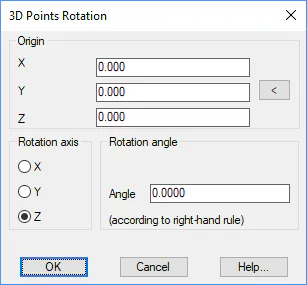
Origin: Coordinates from which the rotation is to be conducted.
Rotation axis: We specify if the roation axis is the X, Y or Z axis.
Rotation angle: We specify the rotation to be used in gradians.
Once the different parameters have been inserted the command will request the points to be rotated using the usual point selection window. After validating this window, the selected points will be rotated.