
tcpScancyr
File - TNSB3
25.1 File
In order to access the most common file menu options there is a toolbar in the main window.
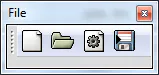
Figure 65 - Project File Toolbar
The icons from left to right are:
New Project: Opens a dialog box in order to create a new project.
Open Project: Opens the file selector to load an existing file.
Project Properties: Opens a dialog box in order to change certain areas of the project.
Save Project: Saves the current project without asking the user for the name. For this option to be enabled, the project should already be located on the computer.