
tcpScancyr
View - TNSB3
25.2 View
Allows you to change the projection type and drawing view. If you are viewing a 2D drawing, these options will be disabled:
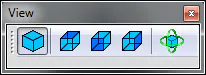
Figure 66 - View Toolbar
The icons from left to right are:
Projection Type: This option will be enabled in the case of 3D drawings. When enabled, orthographic projection will be applied. With this projection, the size of objects will not be based on their distance from the camera. If the option is disabled, a perspective projection will be applied. In this case, the size of the object will depend on their distance from the camera.
Front View Points the camera toward the Y axis
Top view: Points the camera toward the Z axis
Side view: Points the camera toward the X axis
Rotation center: Select a point into the drawing area (there must be something drawn) to change the rotation center.