
tcpScancyr
References to figures - TNSB3
25.6 References to Figures
References to objects allow you to quickly select exact geometrical points in existing figures, without having to know the exact coordinates of those points. References to objects can be used to select the end point of a line or arc, the midpoint of a circle, or any other geometrically significant position.
When more than one reference is activated, the closest of all the enabled ones will be displayed.
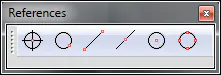
Figure 70 - References to Figures
The icons from left to right are:
Point: Marks a point as a reference.
Close: Marks the point closest to the cursor position, applicable to any figure, except the points.
End point: Marks the edge of the figure, or of one of its parts that is closest to the mouse position. Does not apply to circles.
Midpoint: Marks the midpoint of the figure.
Centre: Marks the center of the figure closest to the mouse.
Quadrant: Marks the four extremities of a circumference.