
tcpScancyr
Help - TNSB3
25.9 Help

Figure 73 - Help
The icons from left to right are:
Measure distances: This command allows one to measure distances between two points, by first selecting the initial point of the measurement, and then the final point. The distance measured will be displayed in the status bar. It is advisable to activate the most necessary references to figures, or else the application may return incorrect data if it does not use the coordinates of the point you believe has been selected.
After the second point is selected, the next window appears.
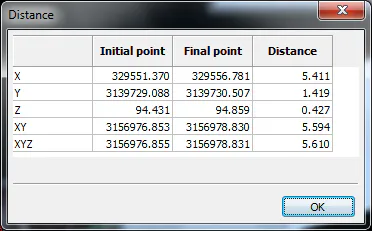
Figure 74 - Measurement between Two Points
The values of the initial and final point in row XY, XYZ represent the distance from the origin to the point on the XY or XYZ plane respectively.
Number Edit: Displays the following window, where the coordinates can be entered manually. If it is a 2D drawing, the Z coordinate control will be disabled.
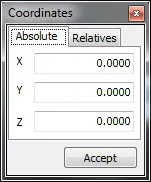
Figure 75 - Manual Coordinates
After entering the coordinates, press OK. In absolute coordinates mode, the entered coordinates will be added. In relative coordinates mode, the entered coordinates will be considered increments since the last point entered.