
tcpScancyr
Modify - TNSB3
25.11 Modify
Commands which allow you to modify polylines.
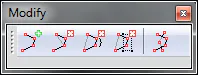
Figure 76 - Tools Used to Modify Figures
Insert vertex: Inserts a vertex at the selected point. It must be near an edge.
Eliminate vertex: Eliminates the selected vertex. It is advisable to have selected the polyline to see where the vertices are.
Eliminate range of vertices: Marks two vertices, with all the vertices between them deleted.
Eliminate vertices window: Marks a checkbox with the mouse and the vertices inside it will be deleted.
Join Polylines: This command allows you to join two polylines. Firstly you will need to draw a polyline that intersects the cross section at two points. You can then use this tool to select the cross section and then the polyline you have created.
Due to the fact that the points that make up the cross section are ordered by angle, there are cross sections that will emerge badly. Using this tool to join polylines you can repair these cross sections.
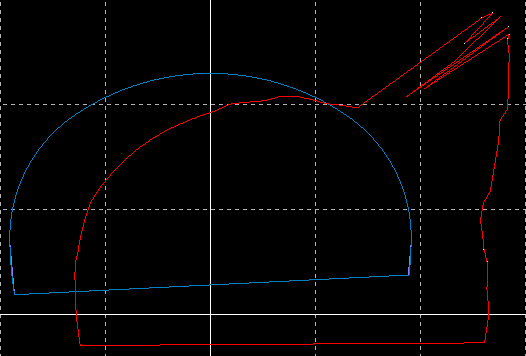
Figure 77 - Cross Section with errors
Draws a polyline that intersects the cross section. For the intermediate vertices you can use the reference tool in order to ensure that the same vertices are used as for the original cross section but taking them in the correct order.
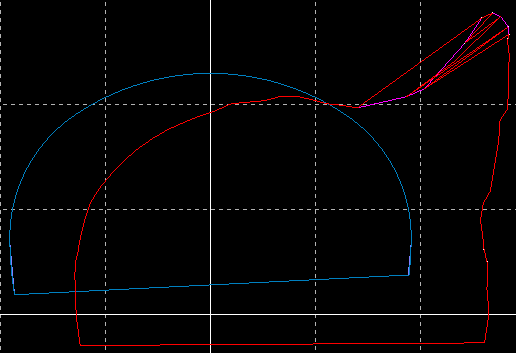
Figure 78 - Polyline Manual in Purple
Using the Join cross sections tool, first select the cross section and then the polyline. The program will automatically join the two polylines.
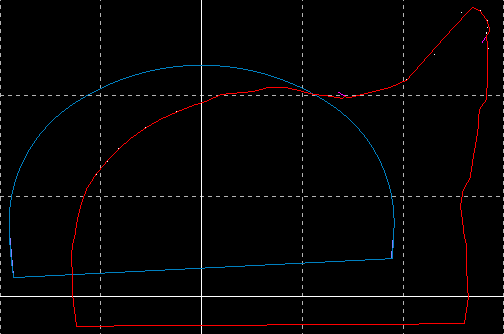
Figure 79 - Corrected Cross Section