
tcpScancyr
Move - TNSB3
25.13 Move
Commands used to move figures.
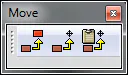
Figure 81 - Move Figures
From left to right, these are as follows.
Move figure: First select the figure to move, then select a point as the origin, and lastly select a point as the destination. The figure will be moved by the vector formed by destination - origin.
Move figure to the origin: First select a figure, then assign a point of origin. The figure will be moved by the vector coordinate origin - point of origin.
Copy with reference point: This command functions as previously (Move figure to the origin), but the figure will be copied to the clipboard. Then go to the layer that is to be modified and paste in the figure using Ctrl+V.
The best way to assign the origin or destination coordinates is to use the references to figures, or enter the coordinates manually, using the Coordinates command.