
tcp PointCloud Editor
Categories properties - PCE
7.36 Categories Properties
Location
- Ribbon menu
- Editing
- CATEGORIES
- Properties... (Edit Categories Properties)
Description
This command causes the category properties dialog to be displayed.
Using the dialog, you can change the visibility, triangulability and colour of LAS categories. You can also change the name of the user LAS categories (32 to 255).
Additionally, you can both import and export the category settings, so that you can use the same settings in different projects.
Parameters
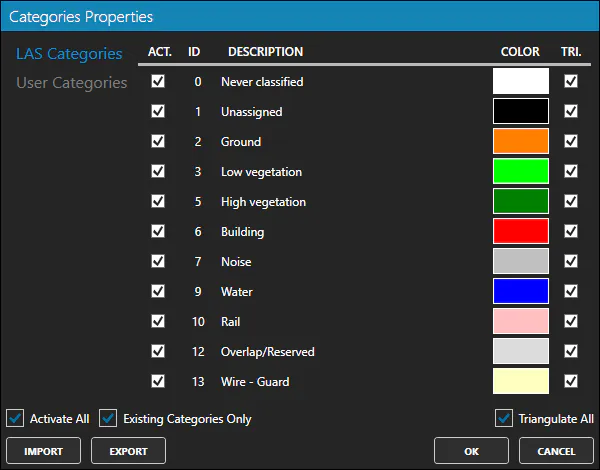
- Category list: List of categories in the project. The list is divided into two parts: the standard categories (0 to 31) and the user categories (32 to 255). Each category has the following properties:
| Property | Description |
|---|---|
| Active | The category is visible and used in calculations. |
| ID | The category identifier. |
| Description | Name of the category. |
| Color | Color of the category. |
| Triangulable | A triangulable category is used on model and profile calculations. Non-triangulable categories are ignored. |
-
Activate All: Activates/Deactivates all categories.
-
Existing Categories Only: When activated, only the categories that are present in the project are displayed.
-
Triangulate All: Mark all categories as Triangulable/non-triangulable.
Use cases
-
Improve the visualisation of previously classified point clouds.
-
Customisation of non-standard categories, to adapt them to the needs of the work to be carried out.
-
Setup of the categories to be used in the calculation of models and profiles (ground modelling).