
tcp PointCloud Editor
Selection by model - PCE
7.13 Selection by Model
Location
- Ribbon menu
- Editing
- SELECT
- By Model (Selection by Model)
Description
This command allows you to select points based on their relative position with respect to a digital model (grid or surface).
Parameters
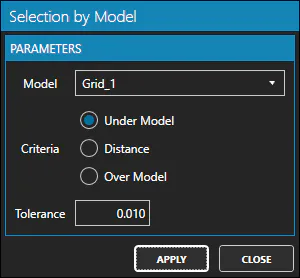
| Name | Meaning |
|---|---|
| Model | The digital model to use as reference |
| Criteria | Below (Under Model), up to a certain distance (Distance) or over the model (Over Model) |
| Tolerance | Distance value respect to the model |
How to use
Set the parameter values and click the Apply button to select the points that meet the criteria.
The form of selection depending on the criteria used is as follows: 1. Under Model: Selects all points below the model and at a distance greater than the Tolerance.
-
Distance: Selects all points above and below the model and at a distance less than or equal to the Tolerance.
-
Over Model: Selects all points above the model and at a distance greater than the Tolerance.