
tcp PointCloud Editor
Selection by color - PCE
7.17 Selection by Color
Location
- Ribbon menu
- Editing
- SELECT
- Attribute
- Color (Selection by Color)
Description
Command to select points based on their RGB colour.
HSV or RGB colour space can be used. While setting the parameters, those points that would be selected with the current parameters are coloured differently (Pre-selection colour).
Parameters
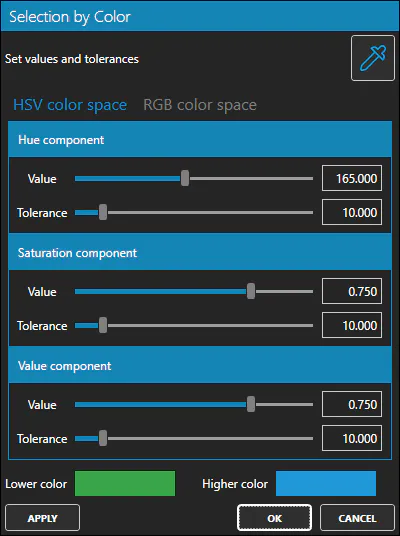
| Name | Meaning |
|---|---|
| HSV Hue Value | Hue value of the color (0 - 360) |
| HSV Hue Tolerance | Hue tolerance (0 - 100) |
| HSV Saturation Value | Saturation value of the color (0 - 1) |
| HSV Saturation Tolerance | Saturation tolerance (0 - 100) |
| HSV Value Value | Value value of the color (0 - 1) |
| HSV Value Tolerance | Value tolerance (0 - 100) |
| RGB Red Value | Red value of the color (0 - 255) |
| RGB Red Tolerance | Red tolerance (0 - 100) |
| RGB Green Value | Green value of the color (0 - 255) |
| RGB Green Tolerance | Green tolerance (0 - 100) |
| RGB Blue Value | Blue value of the color (0 - 255) |
| RGB Blue Tolerance | Blue tolerance (0 - 100) |
How to use
Set the parameters of the colour space you want to work in and click the Apply button, so that the points that meet those criteria are selected.