
tcp PointCloud Editor
Selection by timestamp - PCE
7.20 Selection by TimeStamp
Location
- Ribbon menu
- Editing
- SELECT
- Attribute
- Time (Selection by TimeStamp)
Description
This command allows you to select points on the basis of their time stamp value.
Parameters
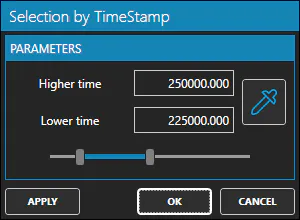
| Name | Meaning |
|---|---|
| Higher Time | Maximum time stamp value. |
| Lower Time | Minimum time stamp value. |
How to use
-
Type the value of Higher Time.
-
Type the value of Lower Time.
-
Use the Range Slider to modify both Lower Time and Higher Time.
Click Apply when the points shown as pre-selected are the ones you actually want to select.