
tcp PointCloud Editor
Selection by vicinity - PCE
7.23 Selection by Vicinity
Location
- Ribbon menu
- Editing
- SELECT
- By Vicinity (Selection by Vicinity)
Description
This command allows you to select points in the vicinity of a given point.
It will: - Take all points in a sphere within Selection Radius from the starting point.
-
Select all points within Vicinity Distance from the starting point and propagate the selection to the nearest points.
-
If Is lower point is checked, the starting point will determine the lower limit of the selection (elevation filtering).
-
If Category Restriction is checked, the starting point category will restrict the selected points (category filtering).
Parameters
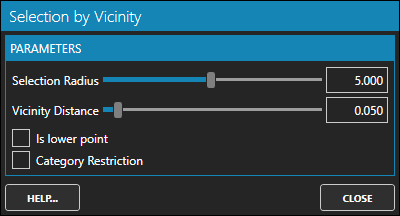
| Name | Meaning |
|---|---|
| Selection Radius | Maximum selection distance from the starting point |
| Vicinity Distance | Maximum distance to another selected point |
| Is lower point | Checked if the starting point determines the lower limit |
| Category Restriction | Checked if only points with the same category as the initial one were to be considered |
Use cases
-
Selection of isolated groups of points.
-
Selection of vertical groups of points.
-
Selection of objects.