
tcp PointCloud Editor
Selection by plane - PCE
7.11 Selection by Plane
Location
- Ribbon menu
- Editing
- SELECT
- Selection by Plane
Description
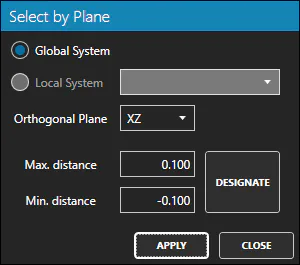
This command selects all the points contained between two parallel planes.
Parameters
| Name | Description |
|---|---|
| Global System | If checked, the planes will be parallel to the global system orthogonal planes XY, XZ and YZ. |
| Local System | If checked, the planes will be parallel to a local system orthogonal planes XY, XZ and YZ. |
| Orthogonal Plane | The XY, XZ or YZ plane of the coordinate system selected. |
| Max. distance | Distance to the origin of the farthest plane. |
| Min. distance | Distance to the origin of the nearest plane. |
How to use
-
Check whether you want to use planes from the global system or from a local system (if you have defined one previously).
-
If you use global system planes, you can use planes parallel to the orthogonal planes XY, XZ and YZ.
-
If you use local system planes, you can use planes parallel to the local system orthogonal planes XY, XZ and YZ.
-
In both cases, you have to set the Max. and Min distances to define the planes.
Remarks
- You can make several selections changing the parameters, without leaving the command.