
tcp PointCloud Editor
Selection by cylinder - PCE
7.8 Selection by Cylinder
Location
- Ribbon menu
- Editing
- SELECT
- Selection by Cylinder
Description
This command selects all the points contained in a cylinder.
The Selection by Cylinder dialog will be shown. There you can set the center, radius and height of the cylinder. Also, in the 3d viewer a cylinder will be displayed. You can change the cylinder parameters using the cone-shaped manipulators.
The points outside the cylinder will be hidden while the selection is being made, to make it easier to see what is being selected.
Parameters
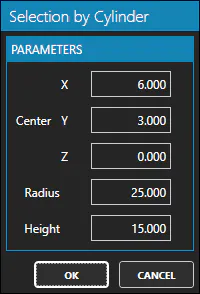
| Name | Meaning |
|---|---|
| Center X | The X-coordinate of the centre of the base of the cylinder. |
| Center Y | The Y-coordinate of the centre of the base of the cylinder. |
| Center Z | The Z-coordinate of the centre of the base of the cylinder. |
| Radius | Cylinder radius. |
| Height | Cylinder Height. |
Remarks
- The cylinder is aligned with the Z axis. It means you can not rotate it in any way.