tcpMDT
Calculate Slope - MDT26
Calculate Slope
 | Command to execute in the CAD |
|---|---|
Vertical menu | MDT26 > Break Lines > Calculate Slope |
Ribbon menu | Break Lines > Creat > Calculate Slope |
Command line |
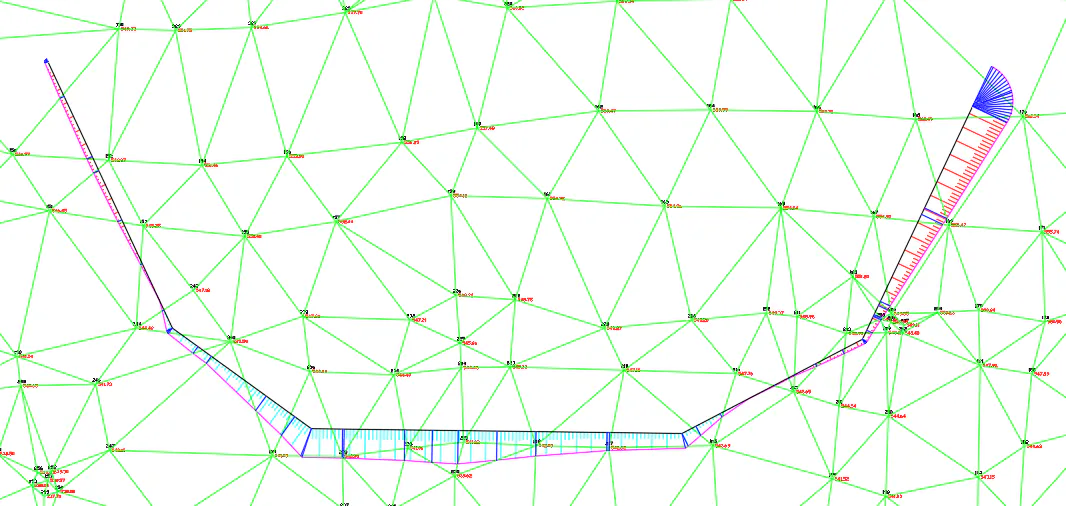
This tool will allow us, from an existing surface and a polyline at a certain level, whether constant or variable, to calculate the contact polyline on the ground according to previously configured parameters.
Initially it will ask us for the polyline from which the slope is going to be calculated and then the direction in which we want to calculate them, graphically we select it with a stretchable line.
Then, the following dialogue will appear, which we will describe below.
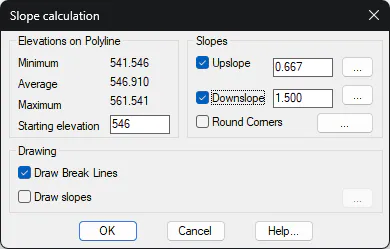
Elevations on Polyline: Displays the existing elevations in the designated polyline area. In Starting Elevation we enter the elevation at which the selected polyline would be located for the calculation of the contact polyline. If this polyline previously had vertices with different elevations, the text Variable would appear.
Slopes: From the selected polyline and to the established Starting Elevation, the program will generate the Upslope or Downslope until reaching the surface level at each point.
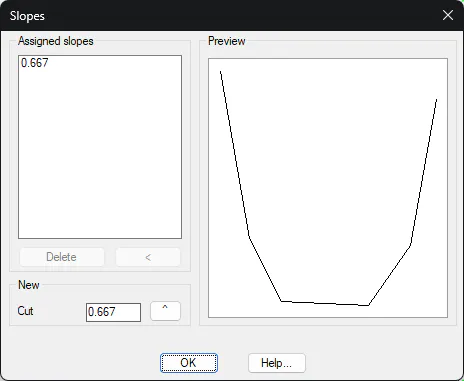
In addition to setting a unique value for the ascending and descending slopes, there is the possibility with the (...) Establish a different slope for each of the vectors of the selected polyline.
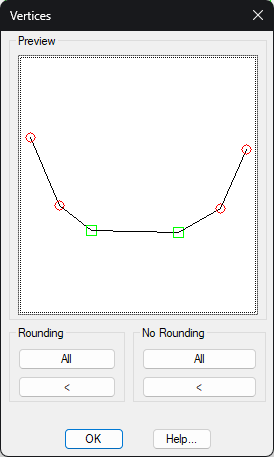
Round corners: If we activate this option, smoothing will be applied to the selected vertices by adding more vertices in the vicinity of the corner. By pressing the (...) The following window will appear in which we can indicate the vertices that we want to smooth. There is the possibility of designating them graphically.
We see the vertices to be smoothed because they are highlighted with a red circle.
Draw Breaklines: If this option is enabled, breaklines will be drawn between the designated polyline and the calculated contact on the ground.
Draw Slopes: Activating this option will draw the combs or slopes, with short and long strokes, between the designated polyline and the calculated contact polyline. With the (...) We have the possibility to configure the drawing of the combs.