
tcpMDT
Convert to 3D - MDT26
Convert to 3D
 | Command to execute in the CAD |
|---|---|
Vertical menu | MDT26 > Break Lines > Edit Break Lines > Convert to 3D |
Ribbon menu | Break Lines > Utilities > Convert to 3D |
Command line |
This command enables break lines to be converted to 3D. Once the polylines to be converted have been selected either by layers or by manually selecting them, the Z coordinate of origin of each of the vertices should be specified. Three options are available for this operation:
Points: The height values assigned to the polylines' vertices are the height values of the corresponding surveying points.
Surface: The Z coordinate assigned to the vertices is obtained from the current surface through planimetric coordinates.
Interpolate: The height assigned is calculated by interpolating or extrapolating the closest vertices' height values.
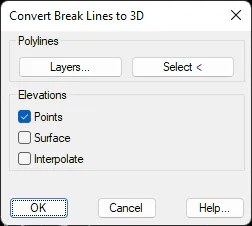
The command has an order of preference when it comes to assigning heights. Firstly, it assigns the values corresponding to any surveying points coinciding with the polyline's vertices. If this is not the case, the heights are obtained from the current surface. Finally, if this is not possible either, the height is calculated by interpolating or extrapolating the closest vertices.