
tcpMDT
Convert to 2D - MDT26
Convert to 2D
 | Command to execute in the CAD |
|---|---|
Vertical menu | MDT26 > Break Lines > Edit Break Lines > Convert to 2D |
Ribbon menu | Break Lines > Utilities > Convert to 2D |
Command line |
At times it may be useful to place the break lines on a plan upon which it is easier to perform certain operations. This command has therefore been implemented, which converts break lines to 2D on the zero-height reference plan.
As shown in the following dialog box, the break lines to be converted can be selected either from the layers on which they are drawn or by identifying them graphically.
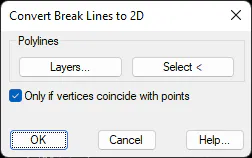
Activating the Only if Vertices Coincide with Points option allows one to only convert to 2D any break lines whose vertices coincide with surveying points. It is then possible to convert them to 3D, ignoring the 3D polylines that could have previously been represented on the drawing.