tcpMDT
Displaced Parallel - MDT26
Displaced Parallel
 | Command to execute in the CAD |
|---|---|
Vertical menu | MDT26 > Break Lines > Displaced Parallel |
Ribbon menu | Break Lines > Creat > Displaced Parallel |
Command line |
This command allows one to create break lines that are parallel to other break lines. It is very useful to define roads, pathways, streets, walls, etc., where only one edge has been measured and the parallel distance to another or others is known, in addition to the other edge's relative or absolute height.
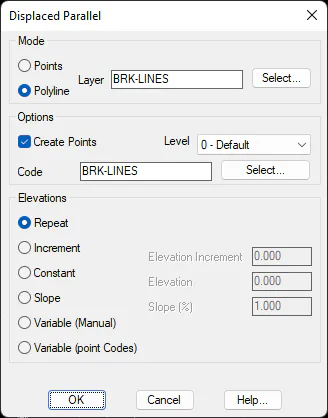
There are two ways of executing this command. In the Points mode, a polyline is drawn as with the Break Lines by Closest Point command and then a line parallel to it is created. In the Polyline mode, a polyline that has already been drawn is selected as a reference to create the parallel line.
In order to create the parallel polyline, the program first requests an orientation indicating a point to the left or to the right of the original polyline and then a distance to the reference polyline. Concerning elevations, one chooses among Repeat the original polylines elevations, apply an elevation Increment to them, use a Constant elevation, create a Slope expressed in % so that the positive values increase the elevation, and the negative values decrease it. Finally, there is also the option to manually enter the elevation at each vertex or use the Point Codes as an increment of the original elevation.
If the Create Points option has been activated, surveying points will be created at each of its vertices with the code selected in addition to the polyline being drawn.