
tcpMDT
Closest Point - MDT26
Closest Point
 | Command to execute in the CAD |
|---|---|
Vertical menu | MDT26 > Break Lines > Closest Point |
Ribbon menu | Break Lines > Creat > Nearest Point |
Command line |
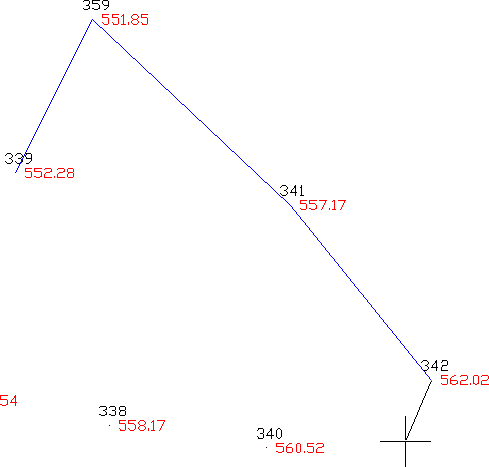
This command allows one to draw break lines between surveying points by taking the points closest to the coordinates selected as vertices. When this command is run, the Layer Selection window is displayed, where the layer in which the new break line will be is selected.
The polyline vertices should then be successively selected with the mouse. It is not necessary to use the reference to CAD objects mode to select the points, since it is sufficient to determine a coordinate close to a point because the program searches for the closest point. The polyline is drawn section by section and the last point can be undone by typing in R or U on the keyboard. By entering C, the polyline is closed with the first point and by right clicking the mouse, the polyline is terminated. As many lines as ones wishes may be drawn until one respond with the key to the First point question:
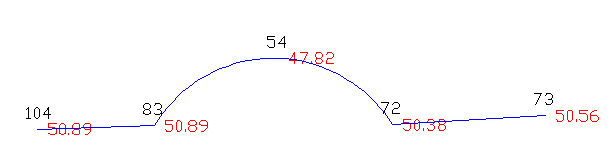
It is possible to draw arcs. By pressing A on the keyboard, the program first requests a crossing point for the arc, initially drawing a straight line. Then it requests an end point for the arc, and it substitutes the previous straight line with an arc. In the following example the points 104, 83, 54, 72, 73 are selected with the mouse, pressing A [Enter] before selecting 54.
Points whose visibility from the point has been deactivated by the Points > Visibility command are not considered in this command, as well as in all other break line commands requiring a search for the nearest point.