
tcpMDT
[PRO] Assembly Library - MDT26
Assembly Library
 | Command to execute in the CAD |
|---|---|
Vertical menu | MDT26 > Templates > Assembly library |
Ribbon menu | |
Command line |
With this tool, a set of roadway platform vectors together with their pavement layers can be defined as a single composition.
This allows the user, during the typical template definition process, to quickly insert a predefined composition along with the roadway section.
When the command is executed, the following dialog box is displayed, where the compositions included by default with the TcpMDT installation can already be viewed.
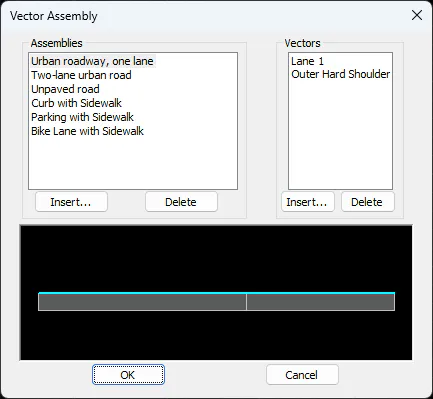
Each composition is made up of a set of vectors, where each vector has its own specific behavior.
In the Compositions list, the Insert and Delete buttons are used to manage the available compositions, allowing the user to add or remove any of them.
When the Insert button is pressed, the program only requests the name of the new composition to be defined.
Once a composition has been selected, the Insert and Delete buttons in the Vectors list — or double-clicking on any vector — allow the user to manage the properties of the vectors that make up that composition.
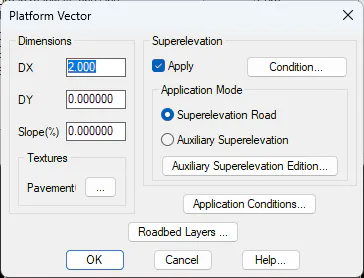
In this dialog box, all properties of the vector to be inserted or edited can be defined, including its dimensions, the superelevation to be applied, and the default pavement layer configuration.
Each component of this dialog is described in greater detail in the Roadway Platform Definition section.