
tcpMDT
[PRO] Assign Properties to Platform Vectors - MDT26

Assign Properties to Platform Vectors
 | Command to execute in the CAD |
|---|---|
Vertical menu | MDT26 > Templates > Assign Properties to Platform Vectors |
Ribbon menu | Templates > Create > Vector Properties |
Command line |
This command is complementary to the previous command Convert Platforms from drawing and will be of enormous use for assigning properties to polylines in top view that define the road and that will comprise platform structures.
The basic function is that once the vectors are assigned to the polyline, the name of the layer in which said polyline is located changes such that, in the later execution of the command Convert platforms from a drawing it interprets the name of the layer in which the polyline is found and the corresponding vectors are associated.
When the command is executed, the program will first request selection of all the polylines we wish to associate the same properties to, once this is done the following window will be displayed:
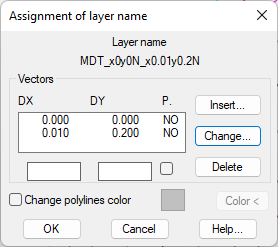
Layer name: Name of the layer to be associated with the selected polylines according to the properties it has been attributed.
Vectors: These are the vectors assigned to the polylines or selected polylines, and with the buttons Insert, Change and Delete we can manage data input.
DX: X displacement of the vector.
DY: Y displacement of the vector.
P.: Indicates whether the vector to create in the platform can be superelevated or not.
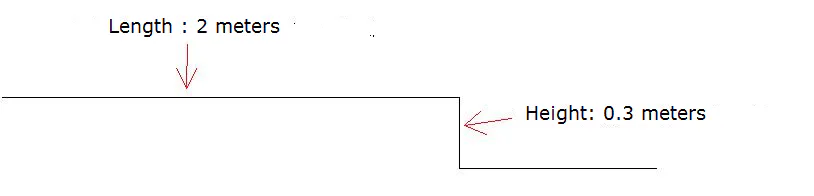
In the case that it presents in the image captured, we attribute a first vector to the polyline selected which would be a 0.3 m-high step and then a straight vector, to simulate a 2-meter long pathway.
Drawn in elevation plan it would be:
Change polylines color: If this option is activated, the color of the selected polylines would change. This option is useful to distinguish those polylines to which we have already attributed properties.
Once the command is finalized, the polylines selected will change to a new layer whose name is given according to the assigned vectors. In the case that it does not present it is associated with the name of the layer MDT_x0y0.3N_x2y0N.
To interpret the name of the layer, with each sequence existing between two characters "_" we have a new vector, in this case the first vector would be:
x0y0.3N where x has an increase of the value of 0.000 and has an increment of the value of 0.3 and the character "N" at the end indicates that it cannot be superelevated. If it can be superelevated the character "S" must appear at the end.
Following the assignment of properties to polylines, it is time to execute the command Convert Platforms from Drawing to automatically create the platform assignment.