
tcpMDT
[PRO] Create Platform form Cross Sections - MDT26
Create Platform form Cross Sections
 | Command to execute in the CAD |
|---|---|
Vertical menu | MDT26 > Templates > Create Platforms from Cross Sections |
Ribbon menu | |
Command line |
This tool allows the automatic creation of platform definitions and assignments from a cross-section file.
The command is designed to automate the generation of platforms from a cross-section file representing the final roadway condition.
To run the command, each vertex in the cross-sections must be uniquely coded and linked to the corresponding platform vectors.
When executed, the program will first prompt the user to select the cross-section file and then the section file to be created.
Next, the following dialog box will be displayed, which is described below.
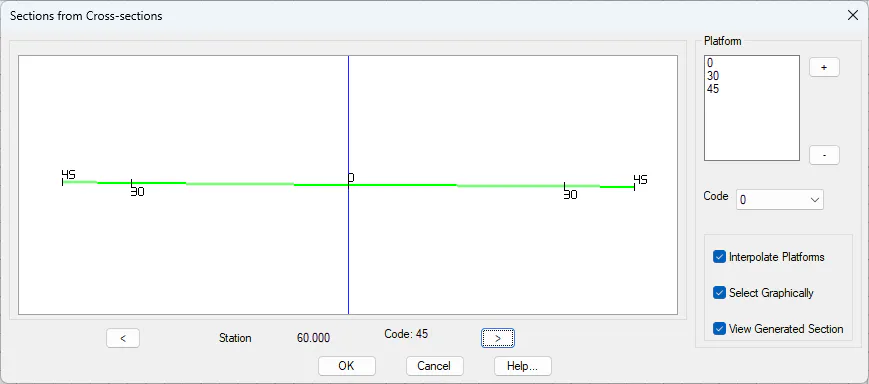
In the graphical area, a preview of the cross-section at the corresponding station (chainage) is displayed. Using the < and > buttons, the user can navigate through the different stations and check the appearance of each cross-section.
In the Platform section, the codes that the software will use to generate the platforms are defined.
Interpolate Platforms: If this option is enabled, once all platforms have been assigned, the software removes those resulting from interpolation between the previous and next station or those that are duplicated.
Select Graphically: When selecting a node in the drawing, the corresponding code is automatically added to the list.
View Generated Section: Once the conversion is completed, the newly created section file will be displayed.