
tcpMDT
Clear Layers - MDT26
 | Command to execute in the CAD |
|---|---|
Vertical menu | MDT26 > Clear Layers |
Ribbon menu | |
Command line |
Clear Layers
This command allows one to delete all the objects associated to previously selected layers.
Once the command is executed, MDT displays the following dialog box where one can select the layers to be cleared.
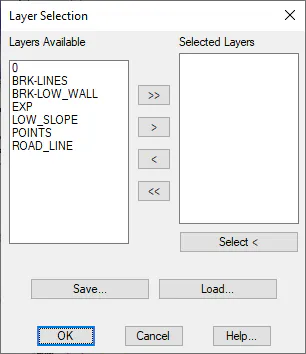
On the right-hand side all the available layers in the drawing are displayed. All the layers one wishes to clear should be entered in the list appearing on the left-hand side
The characteristics of all the window's controls are described below.
< and >: Moves the layer selected from the list from one side to another.
<< and >>: It moves all the layers from one side to another.
Select: By clicking on this button, all the objects on the layers one wishes to clear will be selected graphically.
Save: Once the layers to be cleared have been set, their configuration can be saved with this option.
Load: This is the reverse the previous process. In this case, a file containing the information saved by the previous button is read.
Once the dialog box is validated, the command will be executed, and the objects will be deleted without deleting the drawing's layer.