tcpMDT
Zoom to Scale - MDT26
 | Command to execute in the CAD |
|---|---|
Vertical menu | MDT26 > Utilities > Zoom to Scale |
Ribbon menu | |
Command line |
Zoom to Scale
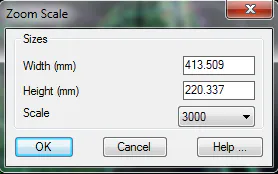
This tool allows one to modify the current drawing's zoom level, allowing it to be measured on screen at a specific scale. It is very useful for tasks like editing cartography and checking if certain details will be visible or not when printed.
The Width and Height fields specify the screen dimensions in millimeters, which are automatically calculated by the program. The Scale box indicates the value of the scale denominator desired.