
tcpMDT
View - MDT26
 | Command to execute in the CAD |
|---|---|
Vertical menu | MDT26 > View |
Ribbon menu | |
Command line |
View
This tool allows you to easily hide or display information grouped in layers. When selected, a window will appear with a series of options that hide or show the corresponding group of layers.
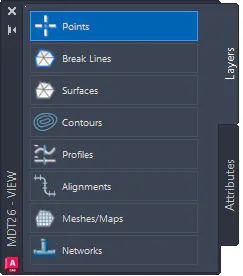
Layers: According to the order of appearance in the previous screenshot.
Visibility of point layers.
Visibility of break line layers.
Visibility of surface layers.
Visibility of layers related to contour lines.
Visibility of layers related to longitudinal and cross profiles.
Visibility of axes.
Visibility of maps and meshes.
Visibility of networks.
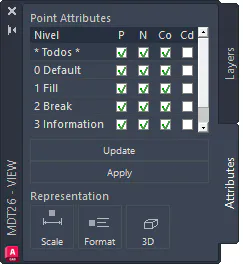
Point Attributes: The visibility of each point level can be changed separately, or all points at once. To apply the changes to the drawing, press the Apply button. When levels are added in the drawing, press the Update button to reflect them in the table.
Scale: Shortcut to the point scale configuration.
Format: Shortcut to the point format configuration.
3D: Allows enabling or disabling the 3D representation of points in the drawing.