tcpMDT
Dimension Polylines - MDT26
Dimension Polylines
This utility will allow us to automatically calculate the 2D and 3D length of all the selected polylines.
When you run the command, the following window will appear in which we manage the information to be labeled.
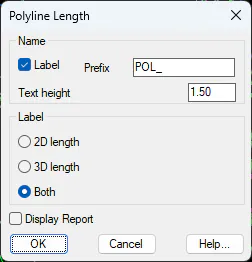
Name: You can assign a name to each polyline. The specified suffix will be followed by a numerical value based on the number of polylines selected.
You can also specify the text height.
Label: Indicate whether to label the 2D length, 3D length, or both.
Display Report: If this option is enabled, a report will be displayed showing the lengths of the selected polylines.
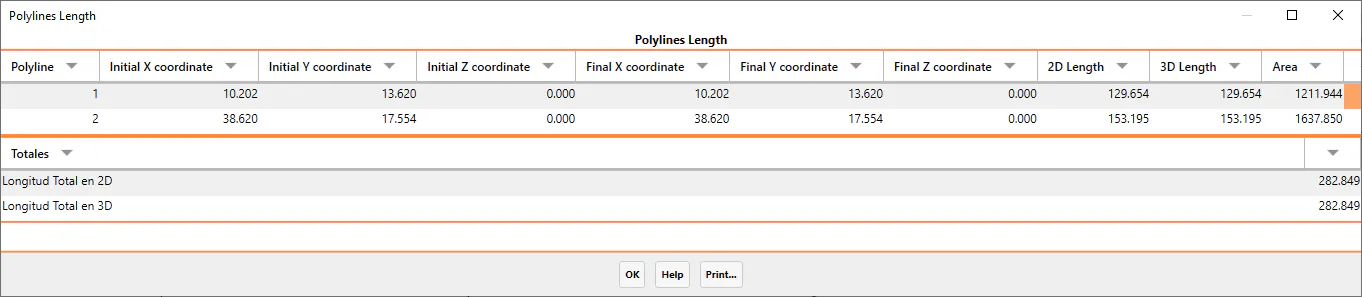
Once the polylines have been selected, the program will show us a list with this information in addition to other parameters such as the initial and final coordinates and the area of the polyline.
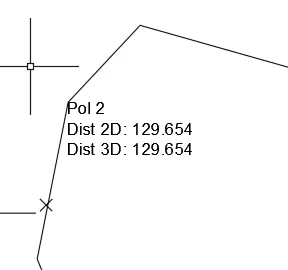
Finally, we will have the possibility to label in the drawing, in the initial vertex of each polyline, the 2D and 3D length of each of them.