tcpMDT
Pipe Vertices Report - MDT26
Pipe Vertices Report
 | Command to execute in the CAD |
|---|---|
Vertical menu | MDT26 > Networks > Pipe Vertices Report |
Ribbon menu | |
Command line |
This option will allow us to generate a report in which the characteristics of the Pipe Section will be shown in the Nodes or with the selected interval.
Initially the following window will appear in which we will indicate the parameters for the generation of the list.
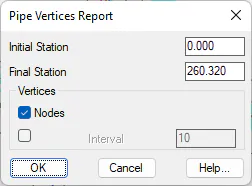
Initial Station: Station from which the report is generated.
Final Station: Station up to which the report is generated.
Vertices
Nodes: If this option is enabled, the information associated with the position of the nodes will be displayed.
Interval: Optionally, it is possible to indicate an interval in the generation of the report.
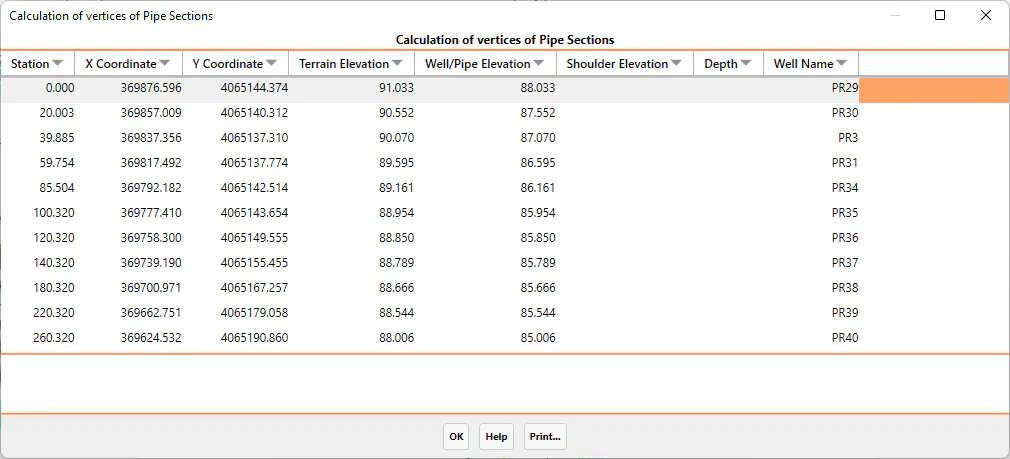
After validating this window, a list will be displayed with the following information of each of the vertices analyzed.
Station
X-coordinate
Y coordinate
Terrain Elevation
The elevation of the well or pipe in the case of corresponding to an interval.
Well/pipe elevation
Depth: difference between the ground elevation and the elevation of the well or section of pipe.
Well name